


RECRUITER READY PROFILE BUILD
Coaches Should Not Have to Guess
Your X profile should quickly show who you are, what you do, and where a coach can evaluate you.
Step 1: Make Your Identity Clear
Your profile should make it immediately obvious who you are.
Name | Profile Headshot Photo
Examples:
Your Name
Your Name | 2027 Kicker
Your Name | 2027 K/P
Your Name | 2027 Long Snapper
Before a coach reads your bio, watches your film, or clicks a link, they will see your name, profile photo, and handle. Those first few details should feel clean, current, and easy to recognize.
Use your real name as your display name. You can also include your graduation class and position if it fits naturally.
Your profile photo should clearly show the athlete. It does not need to be highly produced, but it should be easy to identify at a glance.
Good Options Include
A clean headshot
A close uniform photo
A well-cropped football photo
A clear specialist action photo where the athlete is easy to recognize
Your X handle should also be as close to your real name as possible.
The goal is simple: A coach should not have to wonder whether they found the correct athlete.
What Not to Do
Avoid anything that makes the profile harder to identify or connect to the athlete.
Do not use:
Group photos where the athlete is hard to find
Distant action shots
Blurry or dark photos
Heavy graphics with small text
Photos where the athlete’s face is completely hidden
Unrelated logos or gaming images as the profile photo
Nicknames or handles that do not connect to the athlete’s real name
An old graduation class or outdated position
A profile photo from several seasons ago
Keep it recognizable, current, and easy to understand.
Step 2: Build a Clean Bio
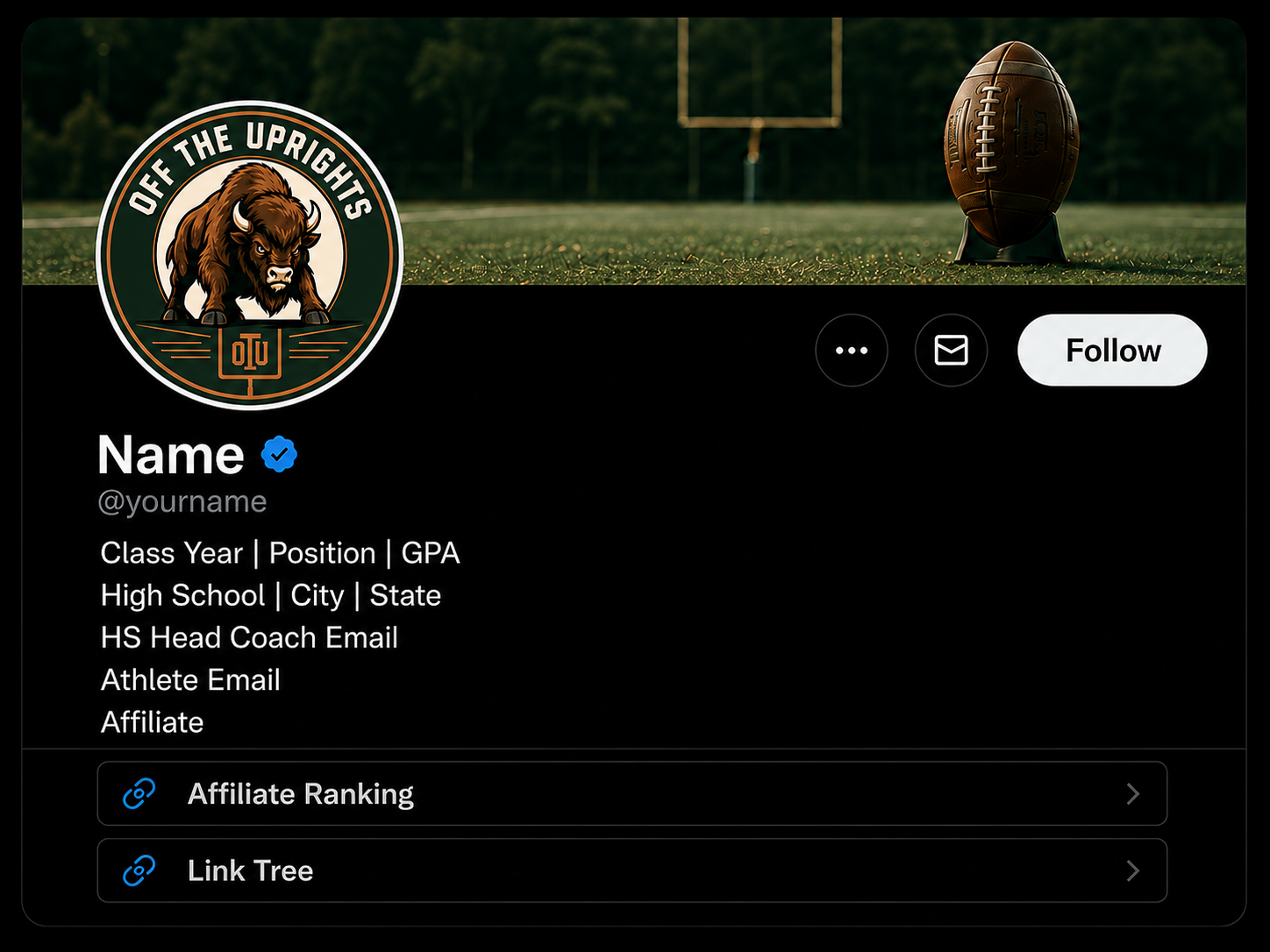
Your bio should give coaches the most important information without making them search through your posts.
Class | Position | GPA | School | City | State | Affiliate Star| Recruit Email| Optional Head Coach Email
2027 Kicker | 3.8 GPA
Your High School | City, State
Affiliate: Specialist Program
Recruit Email: athlete@email.com
Keep it factual, current, and easy to scan. Use short lines and place the strongest information first.
A clean bio should include:
Graduation class
Position
GPA
High school
City and state
Specialist affiliate
Athlete recruiting email
Optional high school head coach email
Because X bios have limited space, not every detail will fit directly in the bio. The key information should appear first, while extra contacts, film, rankings, and recruiting links can live inside your Linktree or recruiting page.
What Not to Do
Avoid turning the bio into a crowded list of everything the athlete has ever done.
Do not use:
Every ranking from every camp
Long lists of awards
Too many affiliate or trainer tags
Old class years or outdated measurements
Unsupported performance claims
Several hashtags
Unrelated quotes or slogans
Broken links
Contact information that is no longer current
So many symbols or emojis that the bio becomes hard to read
The goal is not to fit everything into the bio. The goal is to help a coach understand the athlete quickly.
Step 3: Use One Strong Link
Your profile link should take a Coach somewhere useful.
Recommended Link Order
Place the most important information first:
Current season film
Specialist film or charting
Verified results
Affiliate ranking
Academic information
High school coach contact
Athlete contact
Schedule or recruiting updates
The goal is not to send them to a page filled with unrelated social accounts, old film, broken links, or too many choices. The goal is to make the next step obvious.
A coach clicking your link should be able to quickly find:
Current season film
Specialist film
Verified charting or camp results
Affiliate ranking
Academic information
High school coach contact
Athlete contact
Schedule or recruiting updates
What Not to Do
Avoid links that create more work for the coach.
Do not use:
Broken or outdated links
Old film listed before current film
A cluttered page with too many buttons
Unrelated Instagram, TikTok, gaming, or personal accounts at the top
Vague button labels such as “Click Here” or “My Stuff”
Duplicate links leading to the same place
A page that is difficult to use on a phone
Contact information that is missing or out of date
Rankings or claims that do not lead to a real profile or result
One strong link should help a coach evaluate the athlete faster, not make them search harder.
Step 4: Build the Right Pinned Post
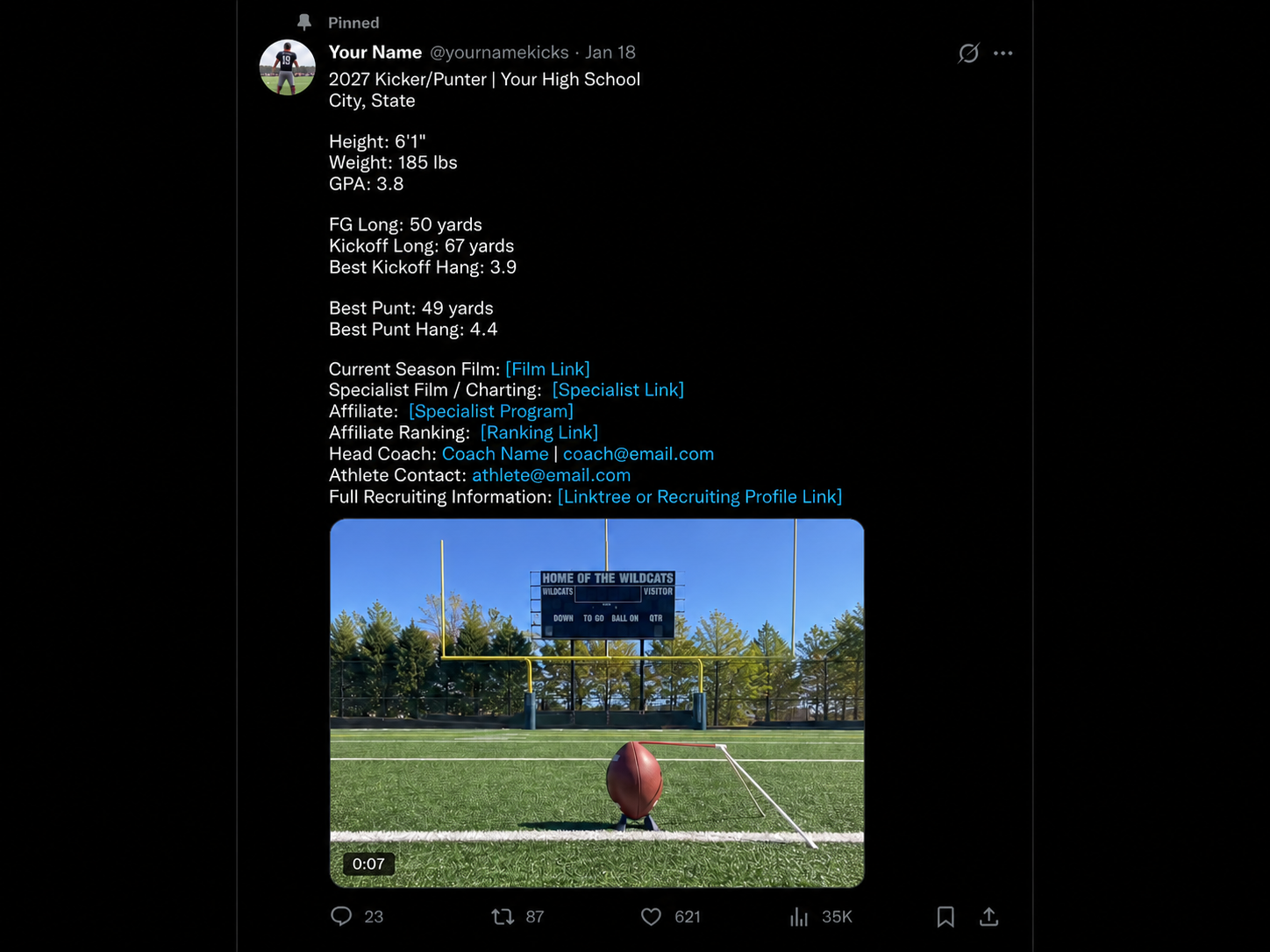
Your pinned post should act as the front page of your recruiting profile.
2027 Kicker | Your High School
City, State | 6'0" | 195 lbs | 3.7 GPA
FG Long: 48 yards
Kickoff Long: 72 yards / 4.0 hang
Season Film:[Hudl Film Link]
Specialist Film / Charting:[Recruiting Link]
Affiliate:[Specialist Program]
Head Coach:Coach Name | coach@email.com
Athlete Contact:athlete@email.com
Full Recruiting Information:[Linktree or Recruiting Profile Link]
It should give coaches one current snapshot of who you are, how to evaluate you, and how to contact you.
A strong pinned post should include:
Graduation class and position
High school and location
Height and weight
GPA
Current season film
Specialist film or charting
Verified measurements or results
Affiliate information
High school coach contact
Athlete contact
One clean recruiting link
What to Attach
Attach one strong piece of media:
A clear action shot
A clean 10-second best clip
A current season highlight
A specialist charting clip
A short video that immediately shows the athlete and the skill being evaluated
The attached image or video should support the post, not compete with it.
Keep It Current
Replace the pinned post when new film, measurements, rankings, or contact information become available.
A pinned post from last season can make an active athlete look inactive.
What Not to Do
Avoid turning the pinned post into a crowded résumé.
Do not use:
A long paragraph with no spacing
Outdated film
Old measurements or rankings
Unsupported performance claims
Several videos attached at once
A crowded graphic with tiny text
Broken links
Ten coach tags at the top
Too many hashtags
“Please recruit me” language
Missing coach or athlete contact information
The pinned post should make it easy for a coach to understand the athlete and take the next step.